
Bench pinout for the Siemens MEV9.2 DME (MV946 and MVS946). Unlike the K-Line ME9.2, these communicate over D-CAN, so on the bench you connect CAN High and CAN Low. Two pins are numbered 1 on different connectors, so use the image to find the right one.
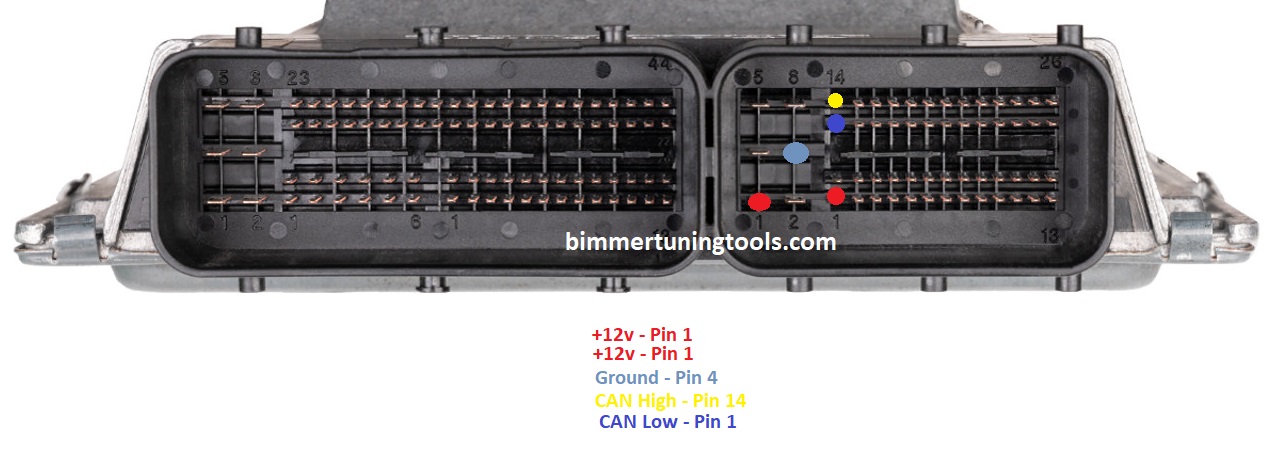
MEV9.2 / MV946 bench pins
| Function | MEV9.2 / MV946 pin(s) |
|---|---|
| +12 V | Pin 1 (see image) |
| +12 V | Pin 1 (see image) |
| Ground | Pin 4 |
| CAN High | Pin 14 |
| CAN Low | Pin 1 (see image) |
Not sure whether you have an ME9.2 or MEV9.2? Use our ECU identification guide.
How to bench flash an MEV9.2
- Connect a stable 12 V supply to DME both power pins (pin 1, see image), and to the KDCAN cable’s 12 V pin (OBD pin 16).
- Connect ground to DME pin 4, and to the KDCAN cable’s ground (OBD pins 4 and 5).
- Connect the KDCAN cable’s CAN High (OBD pin 6) to DME pin 14.
- Connect the KDCAN cable’s CAN Low (OBD pin 14) to DME pin 1 (see image).
- Open ME9.2 Quickflash and read or flash the DME as you would over OBD.
The KDCAN cable needs 12 V and a ground shared with the DME to communicate, just like it gets from the OBD port in the car. Tip: double-check every connection with a multimeter before powering up, and use a power supply rather than a weak battery charger.
Related MEV9.2 tools
- ME9.2 Quickflash – OBD flashing
- ME9.2 IMMO Off – EWS IMMO off token for MV946 / MVS946
- ME9.2 pinout – K-Line ME9.2 variants
- All ECU & TCU bench pinouts