
Bench pinout for the Siemens MSV80 DME (MSV80, MSV80.0 and MSV80.1). Unlike older K-Line DMEs, the MSV80 communicates over D-CAN, so on the bench you connect CAN High and CAN Low instead of a K-Line. The MSV80 has two pins numbered 1 on different connectors, so use the image to find the right one.
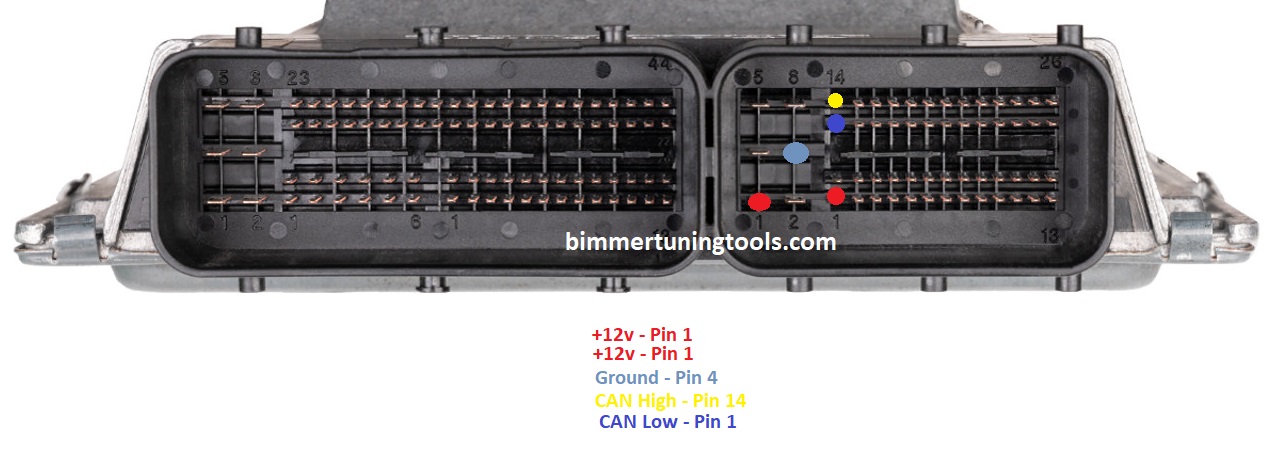
MSV80 bench pins
| Function | MSV80 pin |
|---|---|
| +12 V | Pin 1 (see image) |
| +12 V | Pin 1 (see image) |
| Ground | Pin 4 |
| CAN High | Pin 14 |
| CAN Low | Pin 1 (see image) |
Which cars use the MSV80 DME?
The Siemens MSV80, MSV80.0 and MSV80.1 DMEs run the N51 and N52N six-cylinder engines in the E90 3 Series, E60 5 Series, E87 1 Series and E89 Z4. Not sure what you have? Use our ECU identification guide.
How to bench flash an MSV80
- Connect a stable 12 V supply to both MSV80 power pins (pin 1, see image), and to the KDCAN cable’s 12 V pin (OBD pin 16).
- Connect ground to MSV80 pin 4, and to the KDCAN cable’s ground (OBD pins 4 and 5).
- Connect the KDCAN cable’s CAN High (OBD pin 6) to MSV80 pin 14.
- Connect the KDCAN cable’s CAN Low (OBD pin 14) to MSV80 pin 1 (see image).
- Open MSV80 Quickflash and read or flash the DME as you would over OBD.
The KDCAN cable needs 12 V and a ground shared with the DME to communicate, just like it gets from the OBD port in the car. Tip: double-check every connection with a multimeter before powering up, and use a power supply rather than a weak battery charger.
Do I need to bench flash?
Usually not. MSV80 Quickflash reads and flashes MSV80, MSV80.0 and MSV80.1 DMEs through the OBD port, with virtual full reads and working hours reset. The bench pinout is for DMEs that are out of the car, being tested, or recovering from a failed flash.
Related MSV80 tools
- MSV80 Quickflash – OBD flashing, virtual full reads and working hours reset
- MSD80 / MSD81 / MSV80 IMMO Off – EWS/CAS delete for DME swaps
- All ECU & TCU bench pinouts