
Bench pinout for the Siemens MS42 DME. Use the pins below to power the DME and talk to it over K-Line when reading or flashing on the bench. All bench connections are on the 9-pin power connector, the first connector on the left (circled in green).
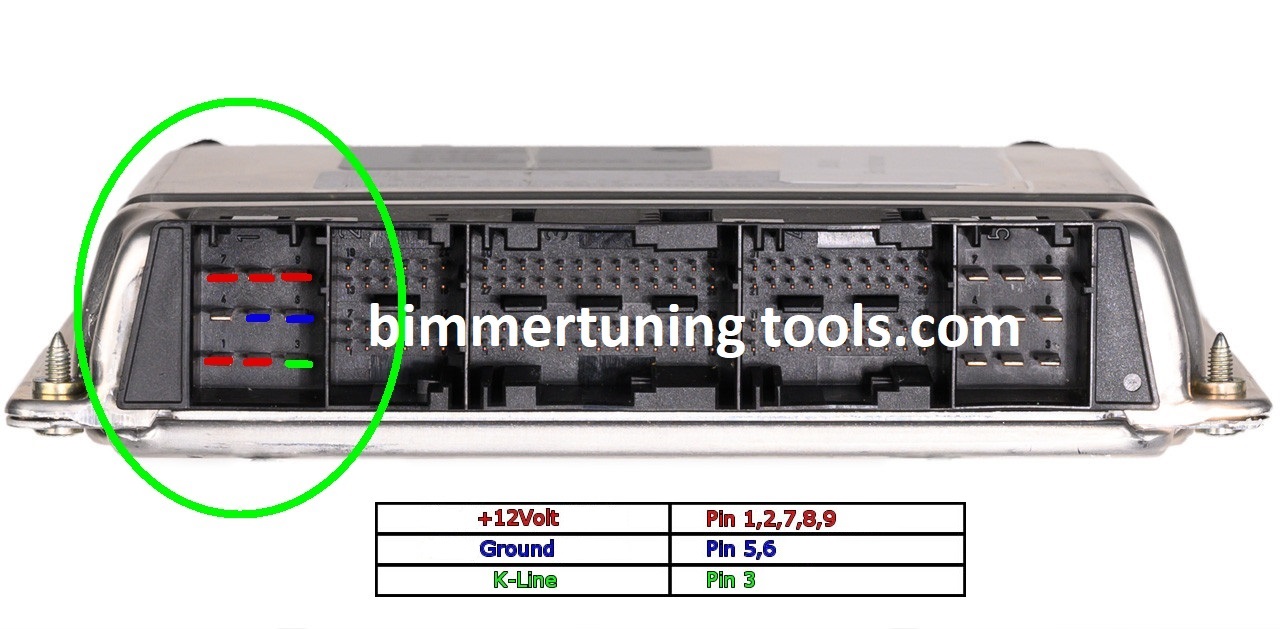
MS42 bench pins
| Function | MS42 pin(s) |
|---|---|
| +12 V | 1, 2, 7, 8, 9 |
| Ground | 5, 6 |
| K-Line | 3 |
Which cars use the MS42 DME?
The Siemens MS42 DME is used on the M52TU six-cylinder in late-1990s-2000s E46 and E39 BMWs. Not sure what you have? Use our ECU identification guide.
How to bench flash an MS42
- Connect a stable 12 V supply to DME pins 1, 2, 7, 8 and 9, and to the KDCAN cable’s 12 V pin (OBD pin 16).
- Connect ground to DME pins 5 and 6, and to the KDCAN cable’s ground (OBD pins 4 and 5).
- Connect the KDCAN cable’s K-Line (OBD pin 7) to DME pin 3.
- Open your K-Line software and connect to the DME as you would over OBD.
The KDCAN cable needs 12 V and a ground shared with the DME to communicate, just like it gets from the OBD port in the car. Tip: double-check every connection with a multimeter before powering up, and use a power supply rather than a weak battery charger.
Related MS42 tools
- MS42 Read Lock – protect your MS42 tuning work
- MS41 / MS42 / MS43 EWS IMMO patcher – disable EWS in MS42 BIN files
- All ECU & TCU bench pinouts