
Bench pinout for the GS8.60.x (GS860x) transmission control unit (TCU). Use the pins below to power the TCU and talk to it over K-Line when reading or flashing on the bench. All bench connections are on the 9-pin power connector, the first connector on the left (circled in green).
GS8.60.x bench pins
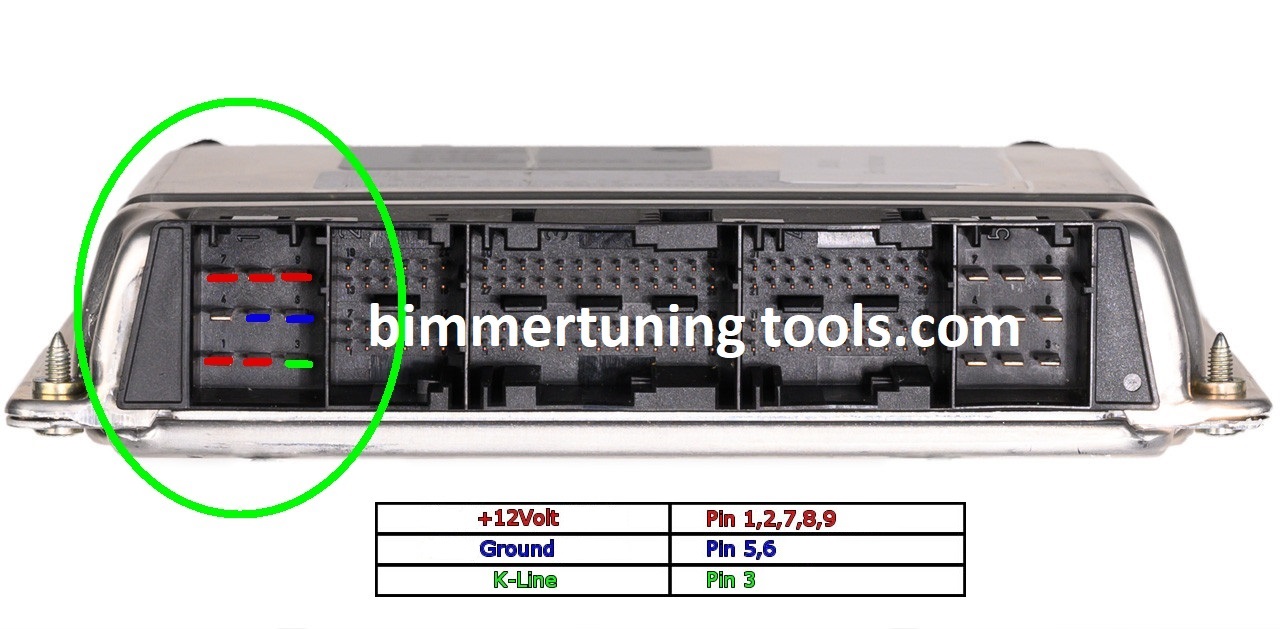
| Function | GS8.60.x pin(s) |
|---|---|
| +12 V | 1, 2, 7, 8, 9 |
| Ground | 5, 6 |
| K-Line | 3 |
Which cars use the GS8.60.x?
The GS8.60.x transmission control unit is used with ZF automatic transmissions in BMWs. Not sure what you have? Use our ECU identification guide.
How to bench flash a GS8.60.x
- Connect a stable 12 V supply to TCU pins 1, 2, 7, 8 and 9, and to the KDCAN cable’s 12 V pin (OBD pin 16).
- Connect ground to TCU pins 5 and 6, and to the KDCAN cable’s ground (OBD pins 4 and 5).
- Connect the KDCAN cable’s K-Line (OBD pin 7) to TCU pin 3.
- Open your flashing software and connect to the TCU as you would over OBD.
The KDCAN cable needs power and a ground shared with the TCU to communicate, just like it gets from the OBD port in the car. Tip: double-check every connection with a multimeter before powering up, and use a power supply rather than a weak battery charger.