
Bench pinout for the Siemens MSD80.2 and MSD81.2 DMEs. Like the MSD80, these DMEs communicate over D-CAN, so on the bench you connect CAN High and CAN Low instead of a K-Line. Two pins are numbered 1 on different connectors, so use the image to find the right one.
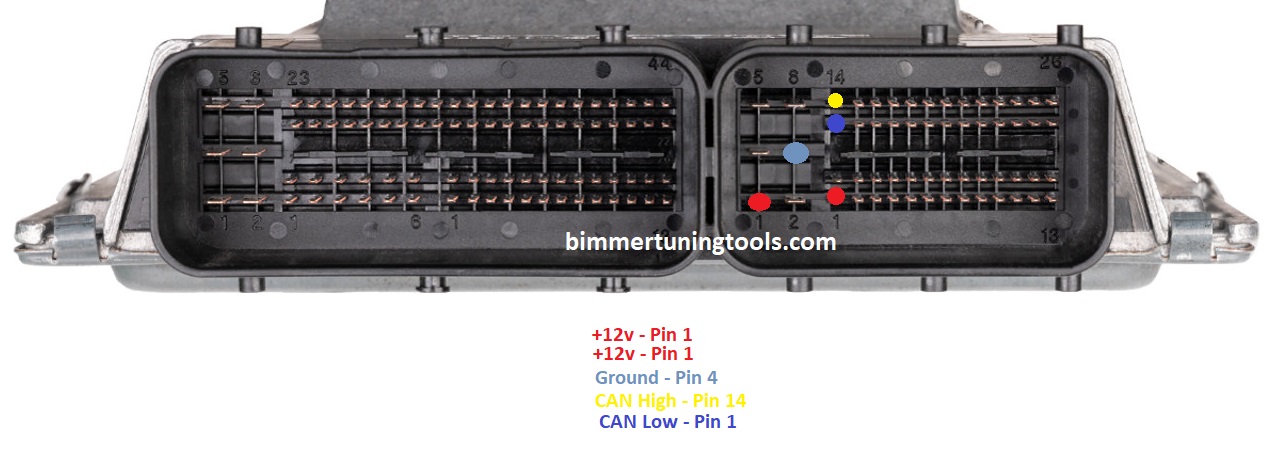
MSD80.2 / MSD81.2 bench pins
| Function | MSD80.2 / MSD81.2 pin |
|---|---|
| +12 V | Pin 1 (see image) |
| +12 V | Pin 1 (see image) |
| Ground | Pin 4 |
| CAN High | Pin 14 |
| CAN Low | Pin 1 (see image) |
Which cars use the MSD80.2 / MSD81.2?
The Siemens MSD80.2 and MSD81.2 DMEs run the N43 four-cylinder in the E90, E60, E87 and E89 Z4. Not sure what you have? Use our ECU identification guide.
How to bench flash an MSD80.2 / MSD81.2
- Connect a stable 12 V supply to both DME power pins (pin 1, see image), and to the KDCAN cable’s 12 V pin (OBD pin 16).
- Connect ground to DME pin 4, and to the KDCAN cable’s ground (OBD pins 4 and 5).
- Connect the KDCAN cable’s CAN High (OBD pin 6) to DME pin 14.
- Connect the KDCAN cable’s CAN Low (OBD pin 14) to DME pin 1 (see image).
- Open N43 Quickflash and read or flash the DME as you would over OBD.
The KDCAN cable needs 12 V and a ground shared with the DME to communicate, just like it gets from the OBD port in the car. Tip: double-check every connection with a multimeter before powering up, and use a power supply rather than a weak battery charger.
Do I need to bench flash?
Usually not. N43 Quickflash reads and flashes MSD80.2 and MSD81.2 DMEs through the OBD port, with full and partial flashing. The bench pinout is for DMEs that are out of the car, being tested, or recovering from a failed flash.
Related MSD80.2 / MSD81.2 tools
- N43 Quickflash – OBD full and partial flashing
- MSD80 / MSD81 / MSV80 IMMO Off – EWS/CAS delete for DME replacements (incl. MSD80.2 / MSD81.2)
- MSD80 / MSD81 pinout – same D-CAN bench layout
- All ECU & TCU bench pinouts